Skip to content
itsorted.online

Payments & accounting

Popular

Accounting Software Setup

Xero, QuickBooks Online or Zoho Books set up from scratch in your name: bank feeds, branded invoices and quotes, user access and your accountant invited.

For new companies, and for businesses still invoicing from Word or Excel, that want proper accounting software without guessing at the settings. We set up Xero, QuickBooks Online or Zoho Books in your company name, connect your bank, brand your invoices and quotes, and invite your accountant, so they can keep the books in a system that is already tidy.

  • 10+ years experience
  • Fixed prices
  • You own everything
  • Secure Stripe payments
  • Written scope & tracking
  • Fix-or-refund promise

What's included

  • Help choosing Xero, QuickBooks Online or Zoho Books for how you work
  • Organisation set up in your company name, on your own subscription
  • Chart of accounts and tax settings agreed with your accountant
  • Bank feeds for up to 2 accounts (direct feed where your bank supports it, otherwise statement import)
  • Branded invoice and quote templates, payment terms and reminder emails
  • Up to 5 users with the right access, plus your accountant or bookkeeper invited
  • Recorded walkthrough and a short how-to for raising invoices and quotes

What you'll get

Illustrative examples of a finished job · swipe for more

Example screen

What you get

Live demos

Try it yourself

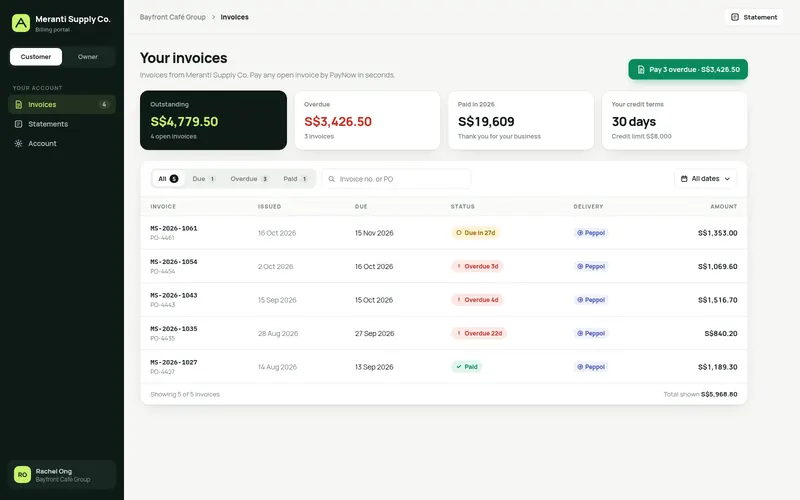
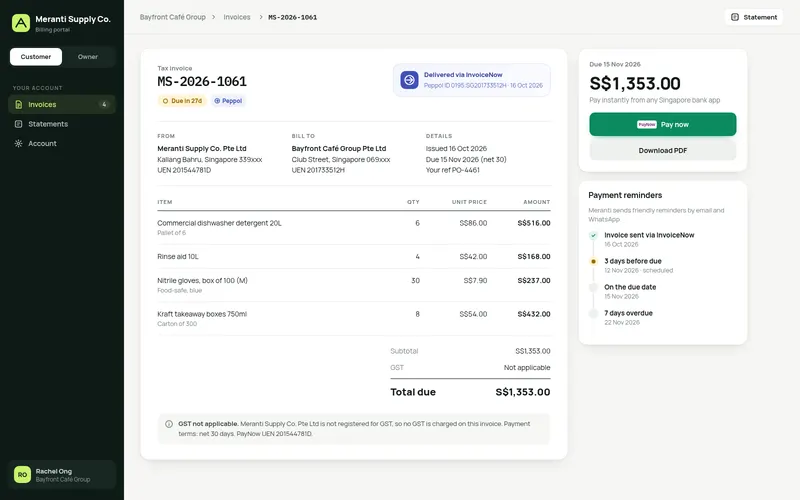
Live demo 1Meranti Supply Co. (trading)

Customer invoice portal with InvoiceNow

A trading company's customers see every invoice in one portal and pay by PayNow in seconds, while the owner watches cash come in, runs automatic reminders and sees payments auto-matched in the accounting software.

  • Invoice list with status filters, search and date range
  • Invoice detail with line items, GST note and Peppol / InvoiceNow badge
  • Pay now by PayNow QR, single or all overdue
  • Automatic reminder schedule, per invoice and global

Not included

  • Bookkeeping, tax or GST filing — your accountant keeps the books; we set up the software and give them access
  • Software subscription fees (paid by you to the provider)
  • Moving data from Excel or an old system (see Accounting Migration)
  • Connecting your store, gateway or marketplaces (see Sales & Payout Sync)

What we need from you

  • A card to pay the software subscription in your name
  • Your logo and invoice details (UEN, address, bank details for invoices)
  • Your accountant's contact and their preferred chart of accounts, if they have one
  • You authorise the bank feed in your own internet banking (we send the steps)

We set up and connect accounting, receipts and payroll software; we are not an accounting or bookkeeping firm. Your accountant or bookkeeper keeps the books, prepares your accounts and handles tax filings. Software subscriptions are opened in your name and paid by you directly to the provider.

Need something custom?Quotes, orders, stock and invoices in one system, a customer portal, or approvals linked to your accounting software. See Custom Business App.

How it goes

  1. 1

    Order & pay

    PayNow or card through Stripe. Receipt emailed straight away.

  2. 2

    Answer a short brief

    A link in your payment email — about 3 minutes, no meeting.

  3. 3

    Give access

    We send step-by-step instructions to invite us — no passwords by email.

  4. 4

    Review & done

    We deliver, you review on your order page, we refine until it's right.

Accounting Software Setup — questions

All three work well for Singapore SMEs. We look at how you sell, how many people use it and what your accountant prefers, then recommend one in writing. The subscription is in your name and paid by you.

No. We set up and connect the software; your accountant or bookkeeper keeps the books, prepares your accounts and handles tax filings. We give them access from day one.

This sets up the accounting software itself. The integration connects an account you already use to Stripe, HitPay or Shopify. If you are starting from nothing, start here.

Save with a kit

Accounting Software Setup is part of this kit

Related guides

All guides

More in payments & accounting